
Software and apps for teams in the US, UK and Europe

Windows Software Development for US and European Businesses

Windows desktop software with a clean installer, an updater that respects the person using it, and an interface that feels at home on the desktop, for teams in the US, UK and Europe. Kapy Notes, our notes app, ships on Windows today.

Kapy Notes ships on Windows
64-bit installers and quiet updates
Windows, Mac and phones from one codebase

64-bit

Windows Installer

29

Releases in 23 Days

1.29

Latest Kapy Notes Release

4

Platforms, One Codebase

What is Windows Software Development?

Windows software development is building desktop applications that install and run on Windows PCs. Doon Digital builds Windows software for businesses in the US, UK and Europe, working from India, and our own notes app, Kapy Notes, ships as a 64-bit Windows installer with a built-in updater, optional window transparency and end-to-end encrypted sync. Because it is built in Flutter, the same product also runs on Mac, iPhone and Android. We handle design, development, packaging, signing and updates.

Windows desktop applications
64-bit installers
Built-in update checks
Cross-platform apps in Flutter
Internal tools for your team
Windows versions of existing apps
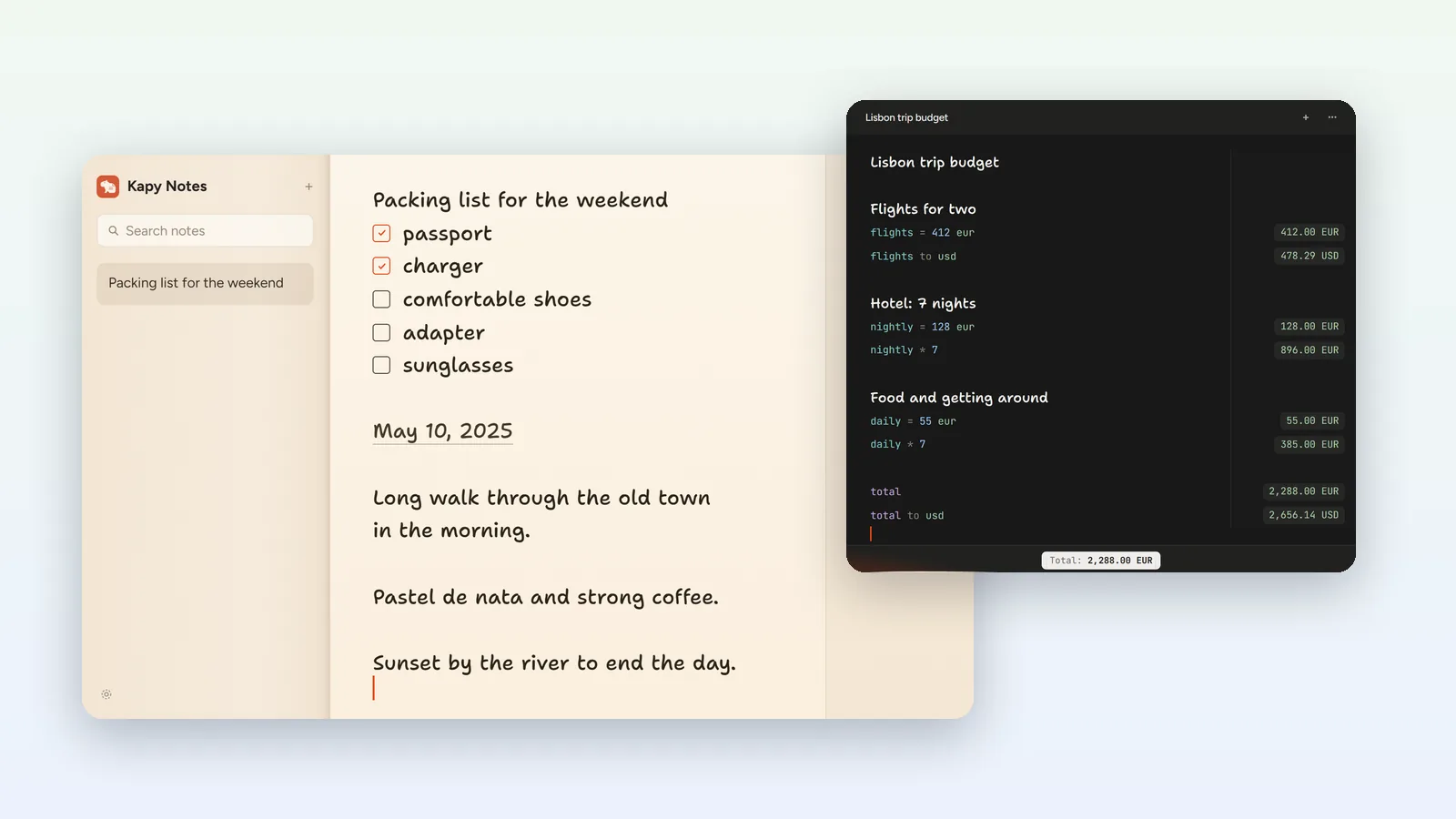
Kapy Notes desktop windows: a notebook with a packing checklist and a trip budget calculated line by line

The Problem

You need software that runs on the Windows PCs your customers or staff already use, but desktop development has traps of its own: installers that set off security warnings, updates that interrupt people in the middle of their work, and interfaces that look out of place next to everything else on the screen.

Our Solution

We build Windows software that installs cleanly, updates on the user's terms and feels at home on the desktop. The team building yours has shipped Kapy Notes on Windows, with a built-in updater and encrypted sync, built in Flutter so the same product also reaches Mac, iPhone and Android.

Our own work

Windows software we have built

Live products you can download and judge for yourself. Every screenshot below comes from the product's own website or its app store listing, and every figure is one those sources state.

Kapy Notes app icon

Kapy Notes

Notes with built-in calculations

Notes that do the math.

A calm notebook for lists, journals and plans where answers appear only on the lines that need them. Write a budget in plain words and the totals, units and currency conversions show up in a slim rail beside it.

macOSWindowsiOSAndroidBuilt with Flutter
  • FlutterOne framework across desktop and mobile
  • EncryptedEnd-to-end encrypted sync, off by default
  • 1.29Latest release, 24 September 2026
  • $24Pro Lifetime at its early-bird price, paid once
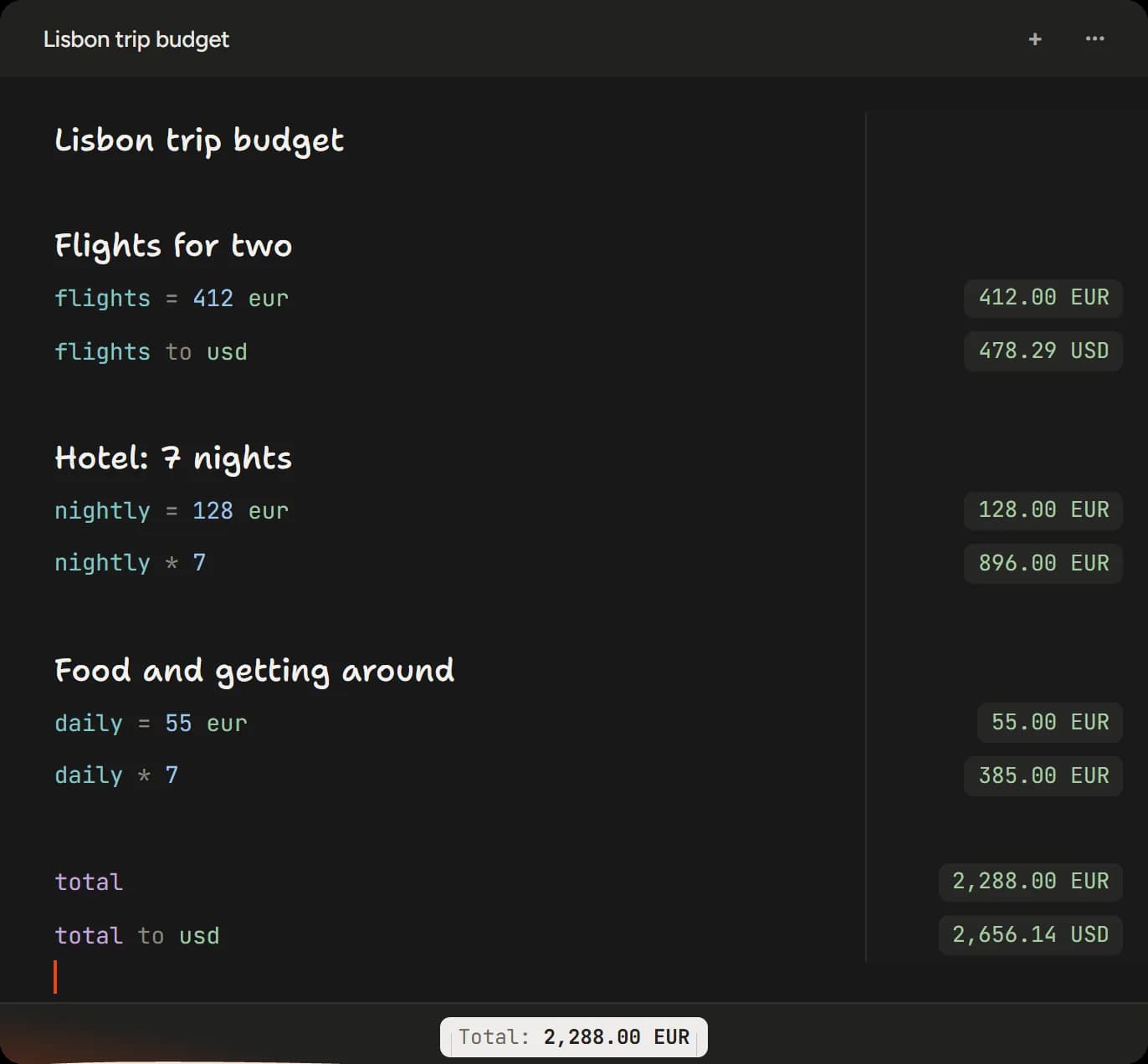
Kapy Notes working out a Lisbon trip budget, with totals and a euro to dollar conversion in a rail beside each line
Kapy Notes working out a Lisbon trip budget, with totals and a euro to dollar conversion in a rail beside each line. Captured from the live app window rendered on kapynotes.com.

Built for Windows

  • A 64-bit Windows installer downloaded directly from kapynotes.com, with no store in between.
  • A built-in updater that checks once a day and downloads nothing until the user asks it to.
  • An optional transparent window: the desktop shows through, blurred, with a slider for how much, while menus and the writing surface keep enough body to stay readable.
  • A keep-on-top window that steps aside for the updater and About panels instead of covering the very dialog the user just opened.

Across the product

  • Inline calculations with variables, units, percentages and currency conversion, answered in a rail beside the lines that ask.
  • Local by default. Sync is optional and end-to-end encrypted with a passphrase only the user knows.
  • Voice notes transcribed and summarised on the device with no account and nothing leaving it, or in the cloud on devices that cannot do it themselves.
  • Shared notes, with collaborators shown by name and picture rather than by email address.
  • Numbers follow the device's region, so a device set to India counts in lakh and crore rather than millions.

What We Offer

Good Windows software installs without fuss, stays out of the way, and never surprises the person using it. That sounds simple, and it is exactly where a lot of desktop software falls down: updaters that download without asking, windows that hide their own dialogs, and settings nobody can make sense of. Kapy Notes is our notes app with built-in calculations, and it ships on Windows as a 64-bit installer downloaded directly from its website. Its updater checks for new releases once a day and downloads nothing until the user asks. It offers an optional transparent window, with the desktop showing through blurred while menus and the writing surface stay readable, and its keep-on-top mode steps aside for the updater and About panels instead of covering them. We built Kapy Notes in Flutter, so the same product also runs on Mac, iPhone and Android, with notes kept on the device by default and synced, when the user chooses, with end-to-end encryption. If your Windows software needs to reach other platforms too, that approach saves building it several times over. Windows is still where most office work happens, and plenty of business tools are better as desktop software than as a website: they open instantly, work offline and sit beside the other programs people use all day. We build internal tools and commercial desktop products, and plan how they will be signed, installed and updated before the first line of code.

Windows Software Development

Windows desktop applications
64-bit installers
Built-in update checks
Cross-platform apps in Flutter
Internal tools for your team
Windows versions of existing apps

Desktop Experience

Windows that feel at home on the desktop
Transparency and appearance options
Keep-on-top windows done properly
Light and dark themes
Regional number formats
Clear, labelled settings

Data and Sync

Local-first storage
End-to-end encrypted sync
Sharing and collaboration
File export
Voice notes and transcription
Account-optional design

Release and Support

Signed installers
Direct download or Microsoft Store
Update checks that download nothing unasked
Changelogs users can read
One-time licences and pricing
Bug fixes and new features

Getting Software Onto Windows PCs

Writing the software is half the job. The other half is getting it installed, trusted and kept up to date on machines you do not control.

Code signing and SmartScreen

Windows warns people before running software from a publisher it does not recognise. Signing the installer with a code signing certificate identifies you as the publisher and builds the reputation SmartScreen looks for, so we treat signing as part of every release.

Installer or Microsoft Store

Software can ship as an installer from your own website, as Kapy Notes does, or through the Microsoft Store, which now accepts traditional desktop apps as well as packaged ones. We recommend a route based on how your users find and pay for software.

Rolling out across a company

Internal tools have to install the same way on every PC. We agree the packaging and update approach with whoever manages your machines, so the software fits the way your IT team already works.

Updates on the user's terms

An updater that checks quietly and downloads nothing until someone agrees, as Kapy Notes does, keeps people working instead of waiting for a restart they did not ask for.

Working With Us From the US, UK and Europe

We design and build from Dehradun, India, for clients in other time zones. Maintainly, one of our own apps, is built for homeowners in the US, UK, Australia and Canada. These are the practical questions overseas teams ask first.

Time zones

India Standard Time is UTC+5:30 all year, with no daylight saving. That puts us 3.5 to 4.5 hours ahead of Central Europe, 4.5 to 5.5 hours ahead of the UK and 9.5 to 13.5 hours ahead of the mainland US. European mornings overlap our afternoons. With US teams we agree a regular call window at the start and keep everything else in writing, so work never waits on a meeting.

How you see progress

As installable test builds and private staging sites rather than slides: TestFlight for iPhone and Mac, Google Play testing tracks for Android, test builds for desktop software and a staging site for web projects. Decisions are written down, so nobody has to remember what was agreed on a call.

Scope, quote and changes

Before work starts you get a written scope and a fixed quote, with milestones agreed alongside it. If the scope changes, we price the change before doing it, so the final invoice holds no surprises.

Ownership and accounts

The contract sets out who owns the code, the designs and the store listings. We recommend that everything lives in accounts your business controls from the first day: your Apple and Google developer accounts, your code repository and your hosting.

Privacy law

If your product offers goods or services to people in the EU or UK, or monitors their behaviour, the GDPR and UK GDPR generally apply. Where we process that data on your behalf we do it under a written data processing agreement, with Standard Contractual Clauses, or the UK equivalent, covering access from India. US state laws such as California's CCPA may apply too. We collect as little as the product needs: Kapy Notes keeps notes on the device unless the user turns on end-to-end encrypted sync.

Accessibility

The European Accessibility Act has applied since 28 June 2025 to many consumer products and services sold in the EU, including e-commerce and banking. In the US, ADA claims regularly cover websites and apps. We plan for screen readers, larger text and colour contrast from the first design, because retrofitting them late costs far more.

Three Ways to Work With Us

A defined project

A new app, a rebuild or a piece of software with a clear goal. We scope it, quote a fixed price and deliver it in milestones you can test, through to the store release or the handover.

A product that keeps shipping

Most software needs a steady rhythm after launch: fixes, new operating system versions and new features. We plan releases with you and keep a changelog your users can read, as Strata, Maintainly and Kapy Notes each do.

Taking over an existing product

If another team built your app or software, we start by reviewing the code, the build setup and the accounts it depends on, then tell you plainly what to keep, fix or rebuild before you commit to anything.

What Decides the Price of an App

We do not publish a price list for apps, because two apps with the same number of screens can differ in cost several times over. These are the things that move the number, so you can see where a budget goes before you ask for a quote.

Platforms

One platform costs less than two. Flutter can cover iPhone, Android and the desktop from one codebase, while a native build for each platform suits apps that live close to the system.

Accounts, sync and a server

An app that keeps its data on the device is simpler than one with sign-in, sync between devices and a server to run. Each layer adds design, build, testing and hosting work.

Payments

In-app purchases and subscriptions bring store rules, receipts, restores and refunds, and Apple's and Google's payment rules now differ between the US, the EU and other regions. Apps that sell physical goods or services take payment outside the stores, which needs a payment integration of its own.

Integrations

Connecting to your existing systems, a CRM, a calendar or a payment provider means building and testing each connection, and keeping it working when the other side changes.

Regulated data and accessibility

Health, finance and children's apps carry extra rules. Accessibility work for the EU or US market needs its own design and testing time, and is far cheaper planned in than added later.

Life after launch

Apple and Google ship a major operating system release every year, and apps need testing and often changes to keep up. Budget for updates from the start rather than treating launch as the finish line.

How a Project Runs

The same steps we follow on our own apps, with test builds in your hands along the way.

1

Scope

We agree what the software must do, who installs it, and which other platforms matter

2

Design

Screens, settings and window behaviour designed and approved before any code

3

Build

The approach that suits the software, including Flutter when other platforms matter

4

Test

On real Windows PCs, across display sizes, scaling and regional settings

5

Package

A 64-bit installer signed with your certificate, release notes and an update check

6

Update

Fixes and features released on a cadence people can follow

What We Have Shipped on Windows

Figures taken from Kapy Notes' own website and changelog, so you can check every one of them.

29

Kapy Notes releases between 2 and 24 September 2026

1.29

Latest Kapy Notes release, 24 September 2026

Daily

Update check that downloads nothing until the user asks

Why Choose Doon Digital?

A team that ships its own apps, and builds yours the same way.

Shipping on Windows

Download Kapy Notes and judge the work

Encrypted Sync

End-to-end, with a passphrase only the user knows

Cross-Platform Reach

Built in Flutter, so Mac, iPhone and Android follow

Written Scope First

A fixed quote and milestones before any code

Frequently Asked Questions

Find answers to common questions about our services.

Tell Us What You Are Building

Send a short brief through the contact form or by email. We reply in writing with our questions, and with a call time that suits your time zone.

Send a Brief Email Us WhatsApp Us
info@doondigital.in|+91-7060329341|Dehradun, India (IST, UTC+5:30)