
Software and apps for teams in the US, UK and Europe

iOS App Development Company for US and European Businesses

iPhone and iPad apps designed, built and published on the App Store for teams in the US, UK and Europe. Two of ours are live there today, Maintainly and Kapy Notes, so you can install our work before you hire us.

2 apps live on the App Store
Widgets, offline sync, in-app purchases
App Review handled for you

2

Apps on the App Store

66

Tasks in Maintainly

3

Maintainly Releases by July

4

Countries Maintainly Serves

What is iOS App Development?

iOS app development is building apps for iPhone and iPad and publishing them on Apple's App Store. Doon Digital builds iOS apps for businesses in the US, UK and Europe, working from India, and has two live on the App Store: Maintainly, a home maintenance app for homeowners in the US, UK, Australia and Canada, with a home-screen widget, lock-screen actions and offline sync; and Kapy Notes, a notes app with on-device voice transcription and a one-time in-app purchase. We cover design, development, App Review and the updates that follow.

iPhone apps
iPad apps
Home-screen widgets
Lock-screen notification actions
Offline-first storage and sync
In-app purchases and subscriptions
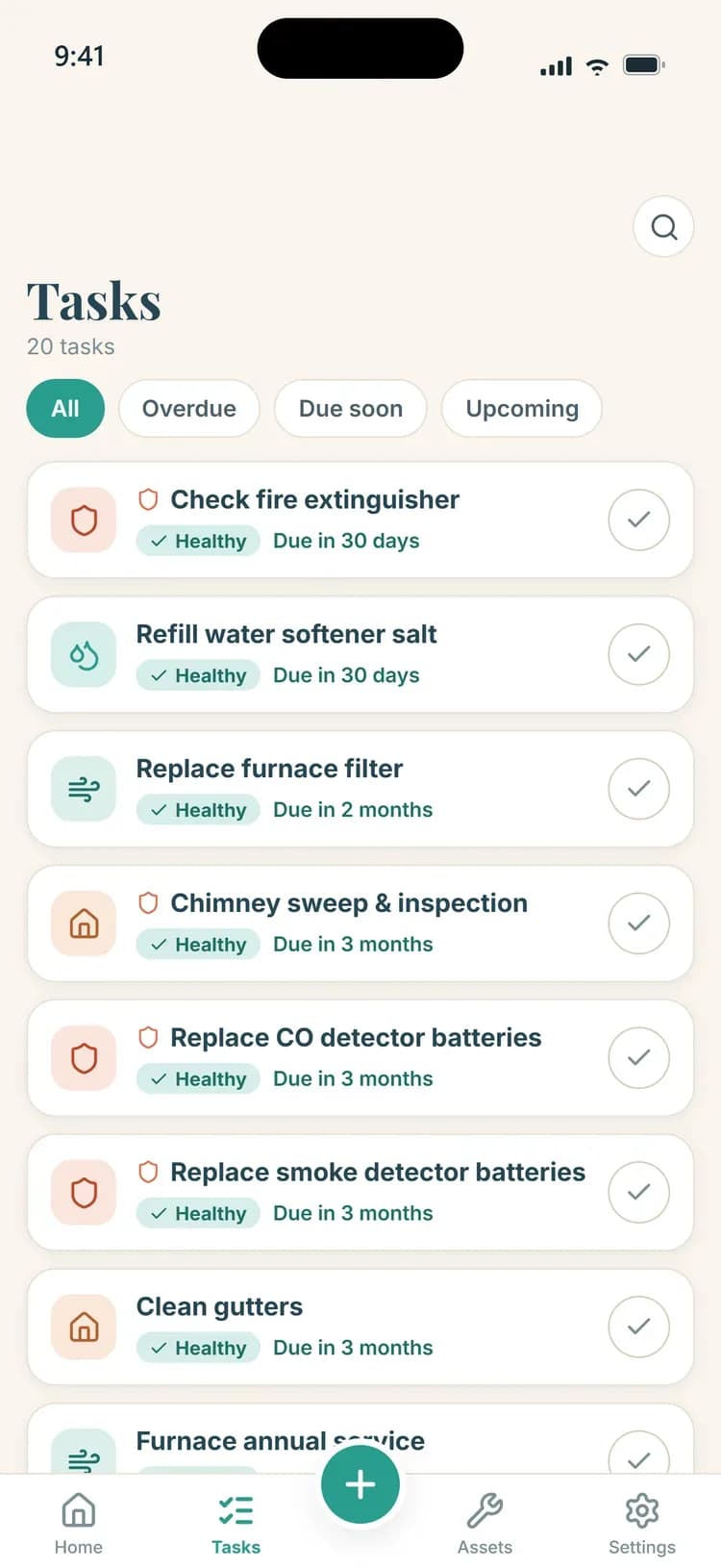
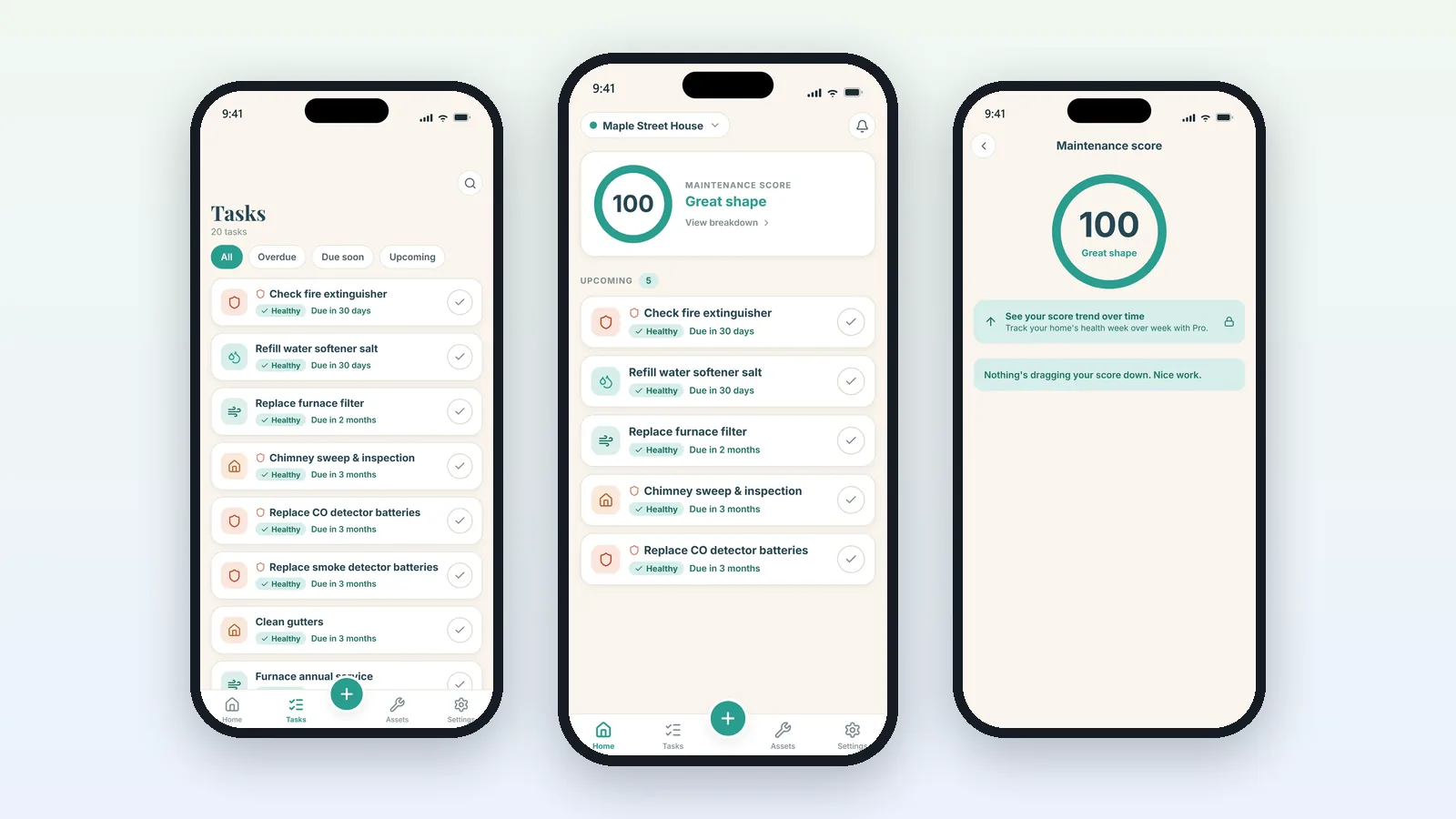
Three Maintainly screens on iPhone: tasks, the home screen with a Maintenance Score, and the score breakdown

The Problem

You need an iPhone app people will actually keep, but most of what makes that happen is invisible in a mockup: notifications that arrive when promised, an app that still works on a train with no signal, a purchase flow Apple approves in every market you sell in, and an update ready when the next version of iOS lands.

Our Solution

We design and build your iOS app, test it on real iPhones, take it through App Review and keep it current afterwards. The team building yours has already shipped Maintainly and Kapy Notes to the App Store, with widgets, lock-screen actions, offline sync and in-app purchases working in production.

Our own work

iOS apps we have built

Live products you can download and judge for yourself. Every screenshot below comes from the product's own website or its app store listing, and every figure is one those sources state.

Maintainly app icon

Maintainly

Home maintenance app for iPhone

Stop small fixes becoming big bills.

Maintainly turns scattered home upkeep into one prioritised plan and reminds people in time, so a $12 filter never becomes a $4,000 repair. It is built for homeowners in the US, UK, Australia and Canada.

iOS
  • App StoreFree to download, with Pro as one purchase
  • 66Maintenance tasks in the built-in library
  • 4Countries, each with its own climate rules
  • OfflineWorks without a connection, syncs later
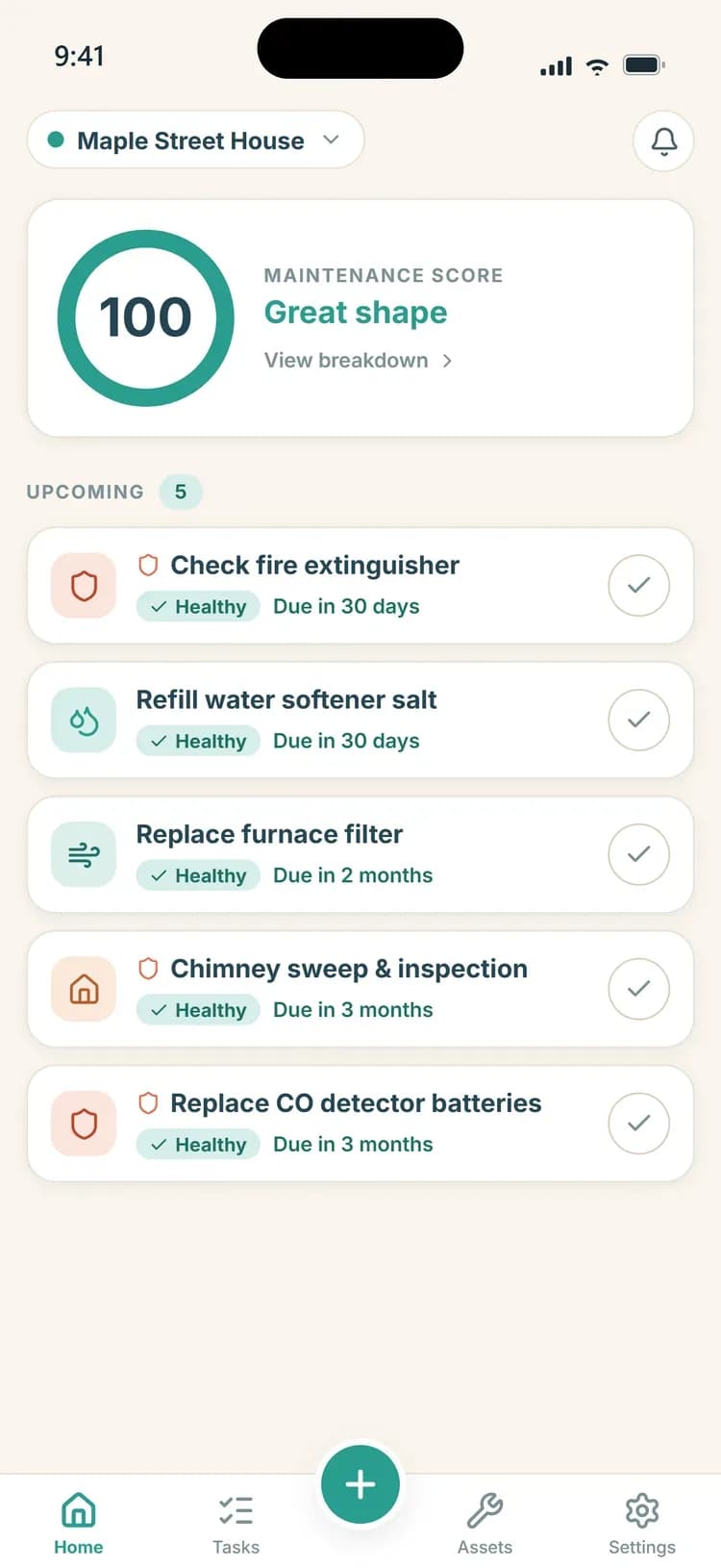
Maintainly home screen with a Maintenance Score of 100 and five upcoming tasks
Maintainly tasks screen filtered into overdue, due soon and upcoming
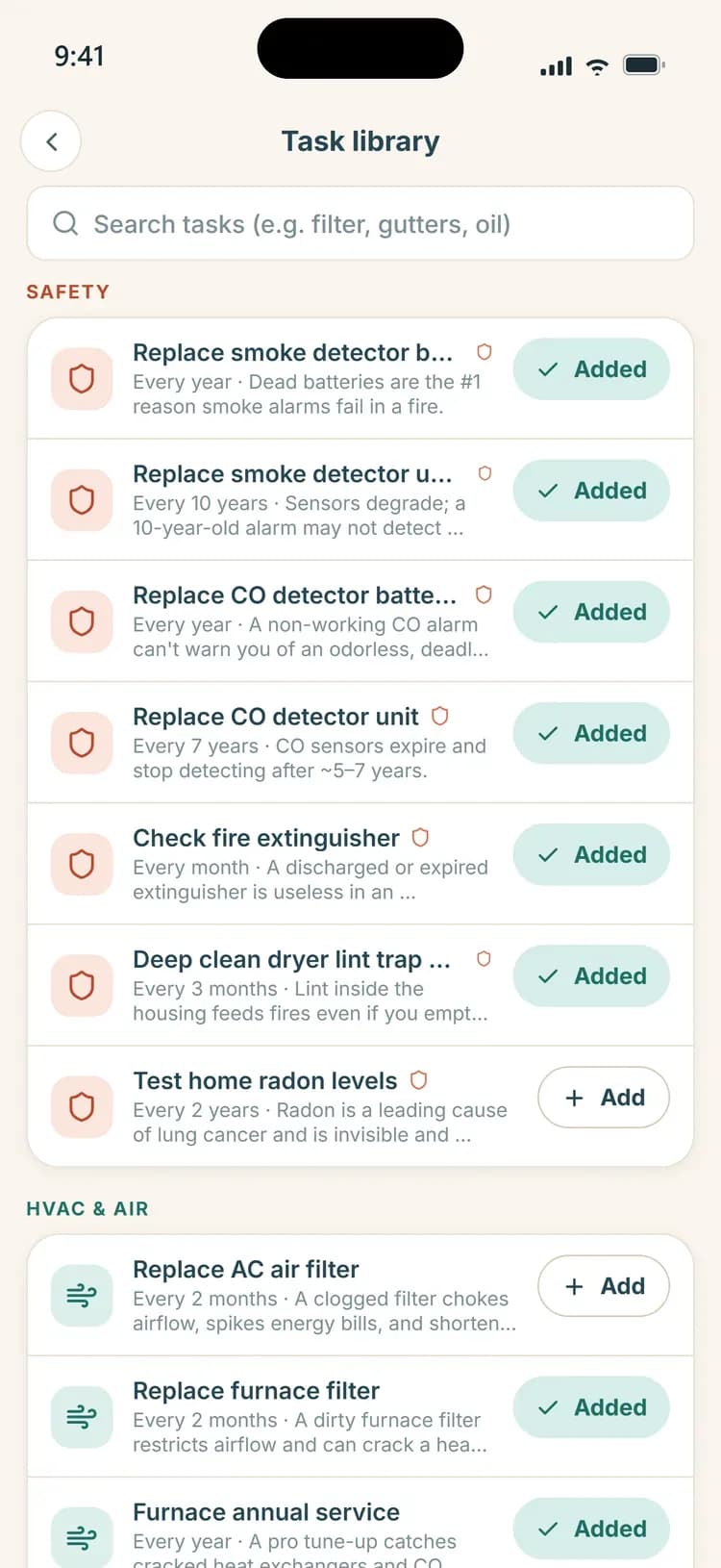
Maintainly task library grouped by safety and HVAC, with one-tap add
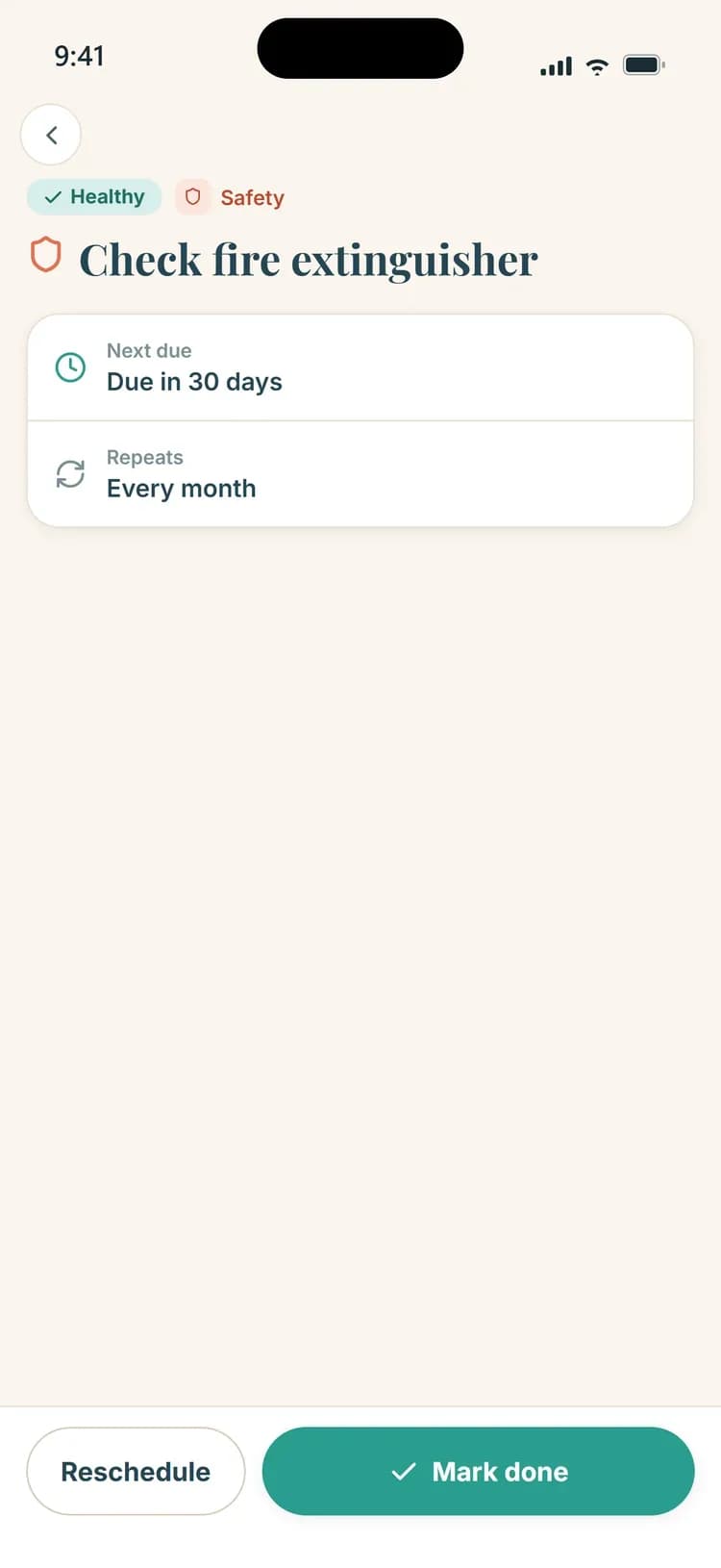
Maintainly task detail for checking a fire extinguisher, with next due date and repeat interval
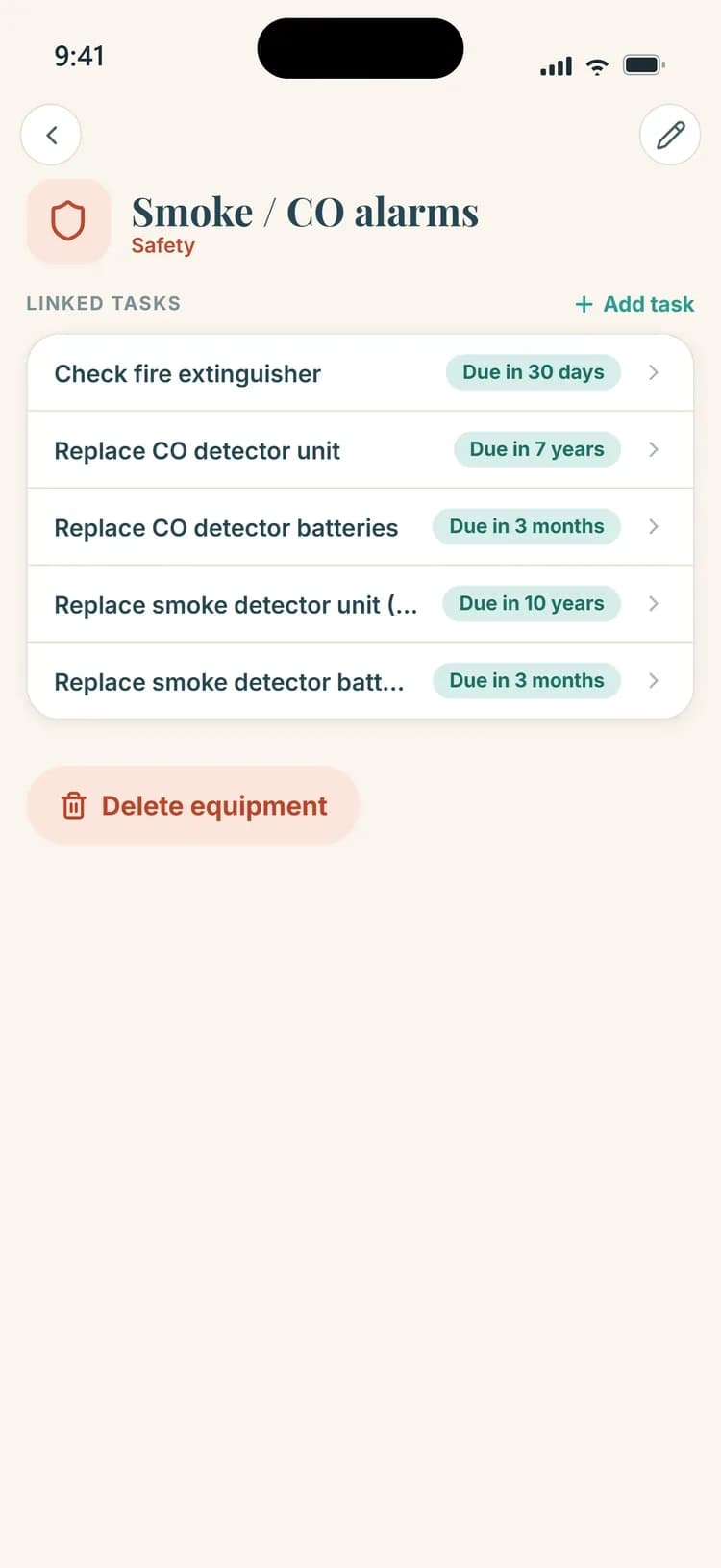
Maintainly equipment page for smoke and CO alarms with five linked tasks
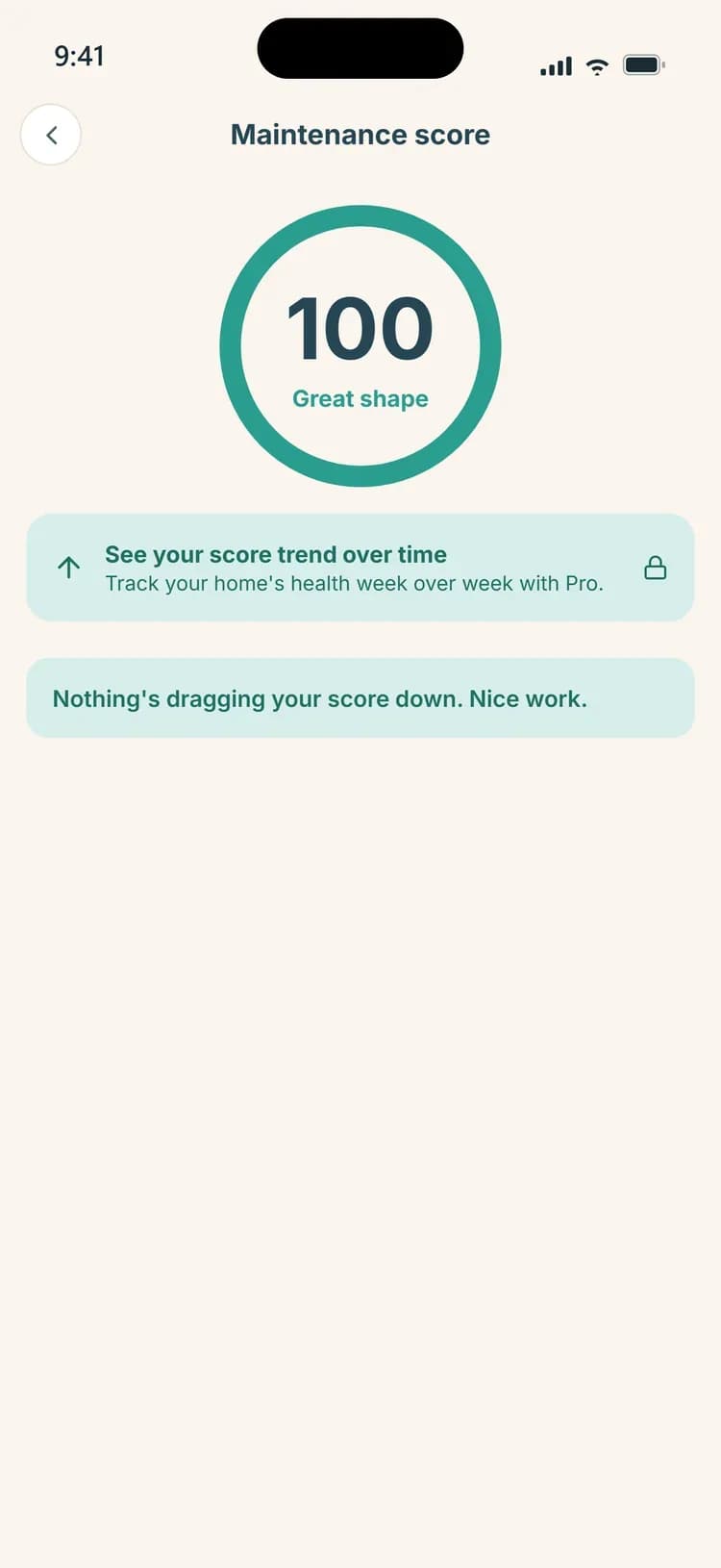
Maintainly Maintenance Score screen with the score ring and what affects it

Unretouched screens from the current iPhone build, as published on maintainly.in. Scroll for more.

Built for iOS

  • A home-screen widget showing the Maintenance Score and the next task due.
  • Lock-screen reminders with Mark done and Snooze actions, so a task can be closed without opening the app.
  • Reminders fall back to local notifications automatically when a connection problem would otherwise have silenced them.
  • Photos attached to tasks and documents are kept in storage iOS cannot clear, rather than in a cache it can.
  • Freeze warnings for pipes and outdoor taps, with no location permission needed.
  • Version 1.0 shipped in June 2026, with two feature releases following by July.

Across the product

  • A starter plan built during a two-minute setup from the home's type, location and equipment, with a Maintenance Score that climbs as tasks get done.
  • Offline-first: tasks are added and completed on the device and sync when the connection comes back.
  • A shareable PDF Home Report with the score, equipment and warranty details, recorded spending and a dated maintenance history.
  • Guest-first onboarding, so nobody needs an account to start using it.
  • Climate and country aware: Australian postcodes resolve to the right climate, so Brisbane is never asked to winterise, and autumn tasks arrive in March.

Kapy Notes app icon

Kapy Notes

Notes with built-in calculations

Notes that do the math.

A calm notebook for lists, journals and plans where answers appear only on the lines that need them. Write a budget in plain words and the totals, units and currency conversions show up in a slim rail beside it.

macOSWindowsiOSAndroidBuilt with Flutter
  • FlutterOne framework across desktop and mobile
  • EncryptedEnd-to-end encrypted sync, off by default
  • 1.29Latest release, 24 September 2026
  • $24Pro Lifetime at its early-bird price, paid once
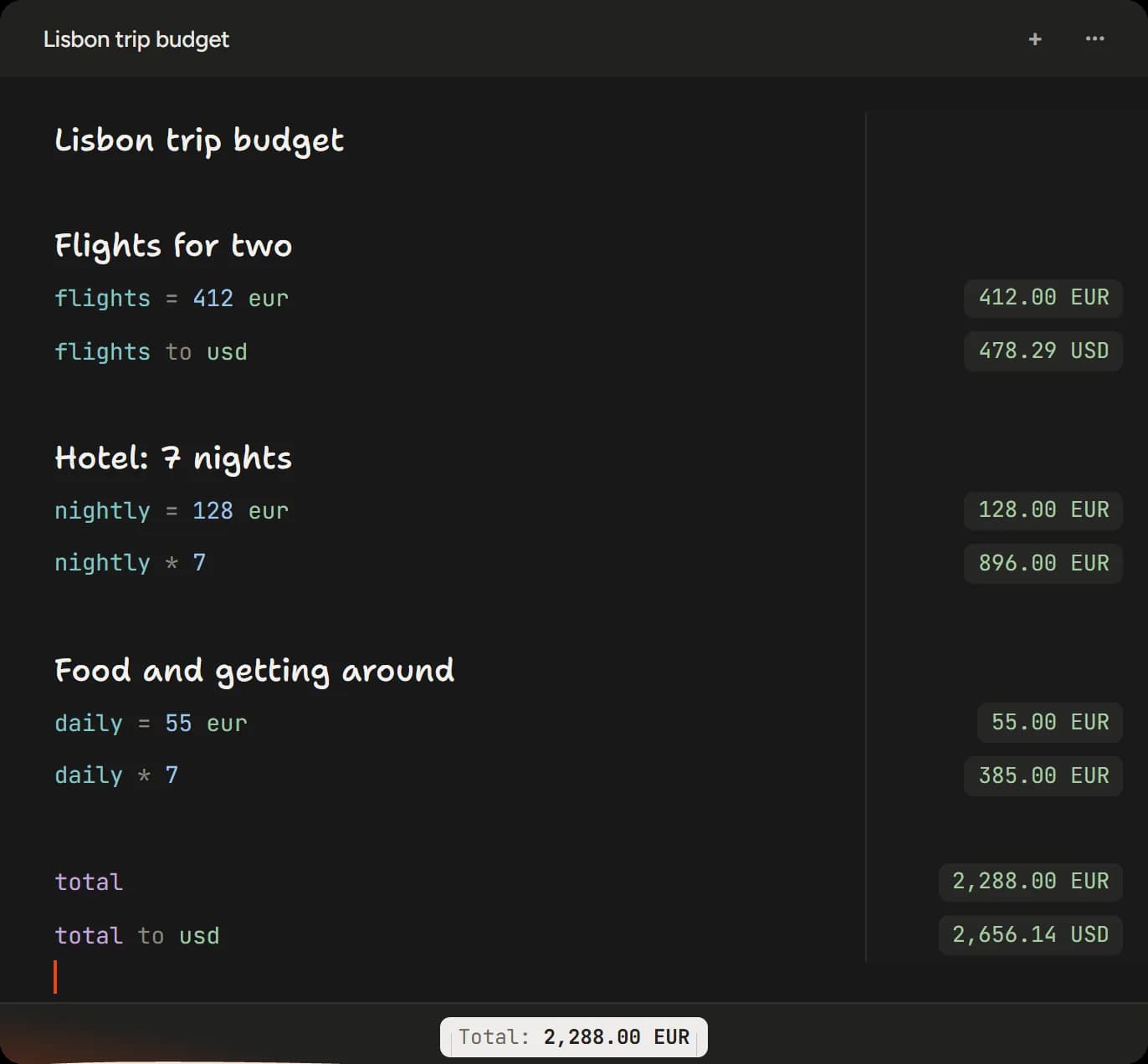
Kapy Notes working out a Lisbon trip budget, with totals and a euro to dollar conversion in a rail beside each line
Kapy Notes working out a Lisbon trip budget, with totals and a euro to dollar conversion in a rail beside each line. Captured from the live app window rendered on kapynotes.com.

Shown in its desktop window. The same workspace runs on iOS.

Built for iOS

  • On iPhone and iPad through the App Store, with Pro sold as a one-time in-app purchase that needs no account.
  • On-device transcription using the speech recogniser Apple ships. It gives up on anything longer than about a minute, so long recordings are fed to it in pieces cut at pauses, and no word is ever split.
  • Exports open the standard Save to Files sheet instead of writing into an app folder nobody was told about.

Across the product

  • Inline calculations with variables, units, percentages and currency conversion, answered in a rail beside the lines that ask.
  • Local by default. Sync is optional and end-to-end encrypted with a passphrase only the user knows.
  • Voice notes transcribed and summarised on the device with no account and nothing leaving it, or in the cloud on devices that cannot do it themselves.
  • Shared notes, with collaborators shown by name and picture rather than by email address.
  • Numbers follow the device's region, so a device set to India counts in lakh and crore rather than millions.

What We Offer

An iPhone app is judged in its first minute: how quickly it opens, whether it demands an account before it has earned one, and whether its notifications are useful or just noise. We build iOS apps that pass that test, and we have two on the App Store to show for it. Maintainly is our home maintenance app for iPhone, built for homeowners in the US, UK, Australia and Canada. It builds a personal plan during a two-minute setup, puts the Maintenance Score and the next task on the home screen with a widget, and lets people mark a job done or snooze it straight from a lock-screen reminder. It works offline and syncs later, and when a connection problem could have silenced a reminder, it falls back to a local notification instead. Kapy Notes runs on iPhone and iPad alongside Android, Mac and Windows. On iOS it transcribes voice notes on the device using the speech recogniser Apple provides, feeding long recordings to it in pieces cut at pauses, and it sells Pro as a one-time in-app purchase that needs no account. Details like these are what separate an app people keep from one they delete. Selling on the App Store in the US and Europe also means knowing where the rules differ. Apple's payment terms for the US storefront and for the EU are not the same as elsewhere, privacy labels must match what the app collects, and accessibility expectations are rising on both sides of the Atlantic. We plan for each market you sell in before the first build goes to App Review.

iOS App Development

iPhone apps
iPad apps
Home-screen widgets
Lock-screen notification actions
Offline-first storage and sync
In-app purchases and subscriptions

Features Users Notice

Reminders that arrive when promised
Onboarding without a forced account
On-device voice transcription
Export through Save to Files
PDF reports people can share
Due dates added to the calendar

App Store Release

App Store listing and screenshots
App Review submission
Privacy labels that match the app
Pricing tiers and paywall setup
Offer codes for referrals
Version notes for every release

After Launch

Updates for each new iOS version
Crash and bug fixes
New features on a release cadence
Reminder reliability improvements
Store listing improvements
A release history users can read

App Store Rules That Shape Your App

Apple reviews every version before it reaches the App Store, and several of its rules affect design decisions long before review. These are the ones we plan around from the first sketch.

Privacy labels and tracking

Every App Store listing shows privacy labels that must match the data the app actually collects, and tracking people across other companies' apps and websites needs their permission through App Tracking Transparency. We fill both in from the app's real data flows, not from a guess.

Sign-in options

If an app offers sign-in with a third-party account such as Google, Apple's guidelines generally require an equivalent privacy-focused option, which Sign in with Apple provides. Many apps need no account at first: Maintainly lets people start as a guest.

Payments in the US and the EU

Digital goods and subscriptions normally go through Apple's in-app purchase. In the US storefront and in the EU, Apple now allows other options under specific terms that differ by region, so we check the current rules for each market before designing the paywall.

Review and release

We prepare the listing, screenshots, review notes and any demo account Apple's reviewers need, and can release updates in phases, so a new version reaches a share of users first while we watch for problems.

Working With Us From the US, UK and Europe

We design and build from Dehradun, India, for clients in other time zones. Maintainly, one of our own apps, is built for homeowners in the US, UK, Australia and Canada. These are the practical questions overseas teams ask first.

Time zones

India Standard Time is UTC+5:30 all year, with no daylight saving. That puts us 3.5 to 4.5 hours ahead of Central Europe, 4.5 to 5.5 hours ahead of the UK and 9.5 to 13.5 hours ahead of the mainland US. European mornings overlap our afternoons. With US teams we agree a regular call window at the start and keep everything else in writing, so work never waits on a meeting.

How you see progress

As installable test builds and private staging sites rather than slides: TestFlight for iPhone and Mac, Google Play testing tracks for Android, test builds for desktop software and a staging site for web projects. Decisions are written down, so nobody has to remember what was agreed on a call.

Scope, quote and changes

Before work starts you get a written scope and a fixed quote, with milestones agreed alongside it. If the scope changes, we price the change before doing it, so the final invoice holds no surprises.

Ownership and accounts

The contract sets out who owns the code, the designs and the store listings. We recommend that everything lives in accounts your business controls from the first day: your Apple and Google developer accounts, your code repository and your hosting.

Privacy law

If your product offers goods or services to people in the EU or UK, or monitors their behaviour, the GDPR and UK GDPR generally apply. Where we process that data on your behalf we do it under a written data processing agreement, with Standard Contractual Clauses, or the UK equivalent, covering access from India. US state laws such as California's CCPA may apply too. We collect as little as the product needs: Kapy Notes keeps notes on the device unless the user turns on end-to-end encrypted sync.

Accessibility

The European Accessibility Act has applied since 28 June 2025 to many consumer products and services sold in the EU, including e-commerce and banking. In the US, ADA claims regularly cover websites and apps. We plan for screen readers, larger text and colour contrast from the first design, because retrofitting them late costs far more.

Three Ways to Work With Us

A defined project

A new app, a rebuild or a piece of software with a clear goal. We scope it, quote a fixed price and deliver it in milestones you can test, through to the store release or the handover.

A product that keeps shipping

Most software needs a steady rhythm after launch: fixes, new operating system versions and new features. We plan releases with you and keep a changelog your users can read, as Strata, Maintainly and Kapy Notes each do.

Taking over an existing product

If another team built your app or software, we start by reviewing the code, the build setup and the accounts it depends on, then tell you plainly what to keep, fix or rebuild before you commit to anything.

What Decides the Price of an App

We do not publish a price list for apps, because two apps with the same number of screens can differ in cost several times over. These are the things that move the number, so you can see where a budget goes before you ask for a quote.

Platforms

One platform costs less than two. Flutter can cover iPhone, Android and the desktop from one codebase, while a native build for each platform suits apps that live close to the system.

Accounts, sync and a server

An app that keeps its data on the device is simpler than one with sign-in, sync between devices and a server to run. Each layer adds design, build, testing and hosting work.

Payments

In-app purchases and subscriptions bring store rules, receipts, restores and refunds, and Apple's and Google's payment rules now differ between the US, the EU and other regions. Apps that sell physical goods or services take payment outside the stores, which needs a payment integration of its own.

Integrations

Connecting to your existing systems, a CRM, a calendar or a payment provider means building and testing each connection, and keeping it working when the other side changes.

Regulated data and accessibility

Health, finance and children's apps carry extra rules. Accessibility work for the EU or US market needs its own design and testing time, and is far cheaper planned in than added later.

Life after launch

Apple and Google ship a major operating system release every year, and apps need testing and often changes to keep up. Budget for updates from the start rather than treating launch as the finish line.

How a Project Runs

The same steps we follow on our own apps, with test builds in your hands along the way.

1

Scope

We agree what version one must do on iPhone, iPad or both, and what can wait

2

Design

Screens that follow Apple's conventions, designed and approved before any code

3

Build

Native iOS or Flutter, chosen to suit the app, with TestFlight builds along the way

4

Test

On real iPhones and iPads, including offline use and interrupted connections

5

App Review

Listing, screenshots, privacy labels and submission handled for you

6

Update

New iOS versions, fixes and features, released on a steady cadence

What We Have Shipped on iOS

Figures taken from the apps' own websites, so you can check every one of them.

2

Apps live on the App Store: Maintainly and Kapy Notes

66

Maintenance tasks in Maintainly's built-in library

3

Maintainly releases between June and July 2026

Why Choose Doon Digital?

A team that ships its own apps, and builds yours the same way.

On the App Store Today

Install Maintainly and Kapy Notes to see our work

App Review Handled

Listing, privacy labels and submission included

Built for Global Users

Maintainly serves homeowners in four countries

Written Scope First

A fixed quote and milestones before any code

Frequently Asked Questions

Find answers to common questions about our services.

Tell Us What You Are Building

Send a short brief through the contact form or by email. We reply in writing with our questions, and with a call time that suits your time zone.

Send a Brief Email Us WhatsApp Us
info@doondigital.in|+91-7060329341|Dehradun, India (IST, UTC+5:30)